




The first thing I upgraded on my cinema rig wasn’t the camera—it was the power system. Learning how to power a cinema camera rig with V-mount batteries completely changed how I worked on set. Instead of juggling several small batteries, I could run my camera, monitor, wireless transmitter, and follow-focus from one reliable source while keeping the rig balanced for longer shooting days.
Professional productions rely on V-mount batteries because they provide longer runtimes, cleaner cable management, and dependable power distribution across multiple devices.
Why V-Mount Batteries Are the Standard for Cinema Rigs
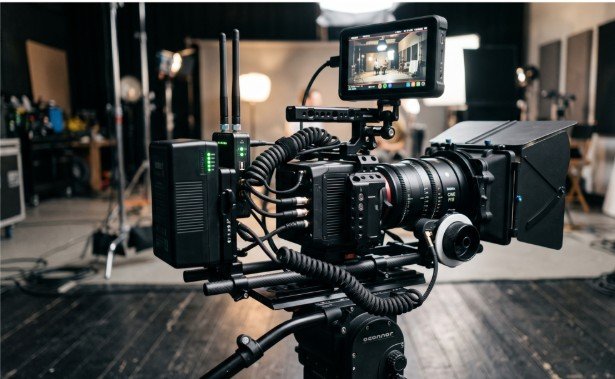
A V-mount battery creates a centralized power source for an entire camera rig. Rather than replacing batteries on every accessory, one battery powers everything through a battery plate.
Battery capacity is measured in Watt-hours (Wh). A 98Wh battery is one of the most popular options because it offers excellent runtime while generally remaining within commercial airline carry-on limits.
I also appreciate the added balance. Mounted behind the camera, the battery naturally offsets the weight of heavier cinema lenses during shoulder-mounted shooting.
The Three Components Every V-Mount Power System Needs
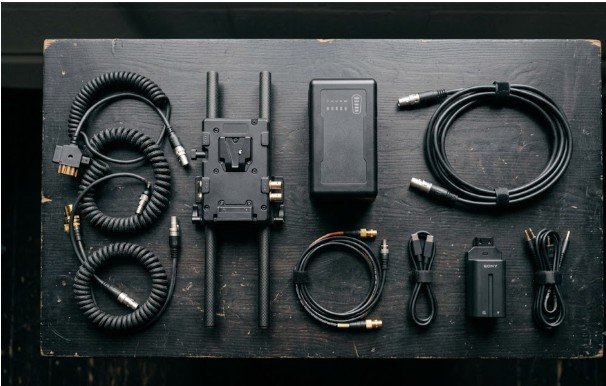
Building a reliable setup requires three essential pieces.
The first is the V-mount battery itself. Different capacities suit different productions, but every battery serves as the main power source for the entire rig.
Next comes the V-mount battery plate. This acts as both the mounting interface and the power distribution hub. It locks the battery securely while providing multiple output ports for connected equipment.
The final component is the collection of dummy batteries and power cables. These allow the battery plate to deliver power safely to cameras, monitors, transmitters, and other accessories.
If you’re building a hybrid shooting system, try a V-mount battery setup for mirrorless cinema cameras to optimize smaller cinema rigs.
Choosing the Right V-Mount Battery Plate
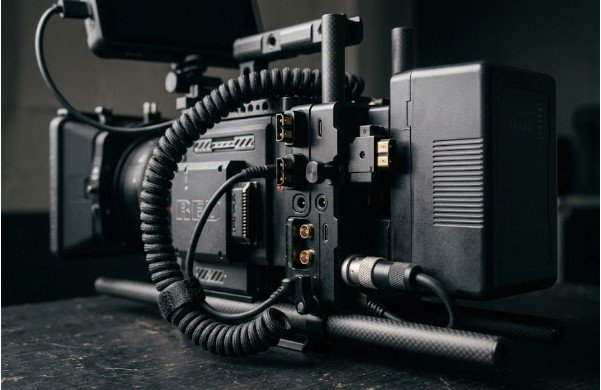
The battery plate matters just as much as the battery. I always evaluate the available output ports before purchasing one.
A quality plate should include D-Tap (also called P-Tap) outputs for powering monitors, wireless video transmitters, and follow-focus motors.
Regulated DC barrel outputs provide stable 7.4V, 9V, or 12V power for cameras using dummy batteries and external accessories.
Modern battery plates increasingly include USB-A and USB-C Power Delivery outputs. These make it possible to charge phones, audio receivers, or even power compatible mirrorless cameras directly through USB-C.
High-end cinema productions may also require regulated 2-pin or 4-pin LEMO connectors for ARRI, RED, and other professional camera systems.
How to Power a Cinema Camera Rig with V-Mount Batteries Step by Step
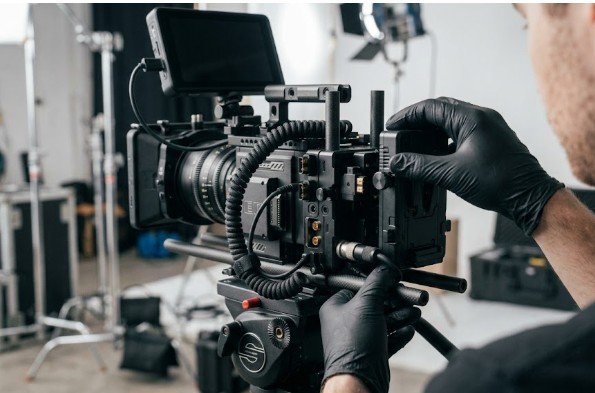
Mount the Battery Plate Correctly
Attach the battery plate securely to the rig’s 15mm or 19mm rod system.
I position mine at the rear of the rig whenever possible. Since V-mount batteries are relatively heavy, placing them behind the camera improves shoulder balance and reduces operator fatigue during long takes.
Power the Camera Body
Mirrorless cameras such as the Sony FX3 or Canon R5 C typically receive power through a compatible dummy battery connected to a regulated 7.4V or 8V output.
Some newer cameras also support USB-C Power Delivery, allowing direct power from compatible battery plates.
Compact cinema cameras, including the Blackmagic Pocket Cinema Camera series, RED Komodo, or Sony FX6, often use dedicated D-Tap to camera-specific power cables that connect directly to the camera’s DC input.
Always confirm that both the cable and output voltage match your camera’s specifications.
Connect Accessories Safely
Once the camera receives stable power, connect additional accessories using the remaining D-Tap or regulated DC outputs.
External monitors, wireless video transmitters, follow-focus motors, and audio equipment can all run from the same battery.
I keep cable runs as short as possible by using coiled cables or securing excess length with Velcro straps. Loose cables quickly become snag hazards, especially during handheld or gimbal work.
Safety Rules That Protect Expensive Camera Equipment
Good power management prevents expensive mistakes.
The first rule involves connection order.
When building the rig, connect every power cable to the camera and accessories first. Only after every cable is connected should you mount the V-mount battery onto the battery plate.
During teardown, reverse the process. Remove the battery first before disconnecting any power cables.
This simple habit minimizes electrical arcing and grounding issues.
Voltage compatibility deserves equal attention.
A fully charged V-mount battery can output approximately 16.8 volts. Sending unregulated D-Tap voltage directly into equipment designed for a maximum of 8.4 volts can permanently damage cameras, monitors, or dummy battery systems.
I never assume compatibility. I verify that every cable, regulator, and output matches the voltage requirements of each connected device before powering the rig.
A Simple Runtime Planning Example
One habit that has saved me countless interruptions is estimating total power consumption before a shoot.
Imagine a setup using a cinema camera, external monitor, wireless transmitter, and follow-focus system drawing approximately 50 watts combined.
A fully charged 98Wh V-mount battery will typically provide close to two hours of continuous operation under those conditions. Real-world runtime varies with battery age, temperature, and accessory usage, but this quick calculation helps me estimate battery changes before production begins instead of reacting to low-power warnings.
Ready to Power Your Next Shoot Without the Guesswork?
After years of building cinema rigs, I’ve found that reliability comes from planning rather than buying the most expensive battery. A properly selected V-mount battery, the right battery plate, compatible cables, and disciplined power management create a setup that works all day without surprises.
Take a few extra minutes to verify voltages, organize cables, and balance the rig before rolling. Your camera—and your production schedule—will thank you.
FAQs
1. Can I power a mirrorless camera with a V-mount battery?
Yes, using either a regulated dummy battery or USB-C Power Delivery if your camera supports it.
2. What size V-mount battery is best for travel?
A 98Wh battery is commonly preferred because it generally complies with commercial airline carry-on limits.
3. Can I power multiple accessories from one V-mount battery?
Yes. A battery plate distributes power simultaneously to monitors, transmitters, follow-focus systems, and other compatible accessories.
4. How to power a cinema camera rig with V-mount batteries safely?
Always verify voltage compatibility and connect cables before mounting the battery to prevent electrical damage.